
Vocalz: AI Voice Messenger
Overview
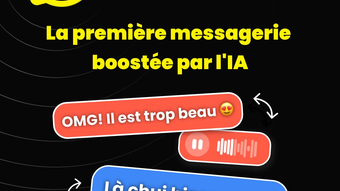
Vocalz: AI Voice Messenger is a free iOS application designed for voice-based social interaction. Developed by AI VOICE MESSAGING, the app focuses on enabling users to send and receive voice messages through artificial intelligence-enhanced features. It is tailored for individuals seeking a more expressive and immediate form of digital communication, particularly within personal and social circles.
The app operates exclusively on iPhone devices running iOS 16.4 or later, targeting users who prefer audio over text in their messaging habits. Its primary function centers around voice messaging, leveraging AI to potentially improve clarity, delivery, or transcription accuracy. While the developer has not provided further details on the underlying technology, the app’s focus on AI-driven voice interaction suggests an effort to modernize traditional messaging experiences.
It is available only in French, which may limit accessibility for non-French-speaking users. Real-world use cases include quick personal check-ins, group conversations, and informal social updates where voice adds emotional nuance. The app was released on December 16, 2023, and is currently at version 1.0.18.
Key Features & Capabilities
- AI-Powered Voice Messaging – The app uses artificial intelligence to process and deliver voice messages, potentially enhancing audio quality, reducing background noise, or improving transcription accuracy for future use.
- Text-to-Speech Integration – Users may benefit from AI-generated voice responses, allowing for automated or synthesized replies within conversations.
- Real-Time Voice Interaction – Enables immediate voice exchanges without the need for typing, ideal for fast, natural communication.
- Language Localization – The app is currently available only in French, suggesting a targeted release for French-speaking audiences.
- Minimalist Design for Voice-First Use – The interface appears optimized for voice input and playback, reducing visual clutter to prioritize audio interaction.
These features are intended to streamline communication by focusing on spoken word. For example, users can record a quick voice note to a friend while on the go, with AI potentially summarizing or transcribing the message. In group settings, the app could allow users to share voice updates without the need for lengthy text messages. The AI integration may also assist in filtering or organizing messages based on tone or content, though specific functionality was not detailed by the developer. The app’s reliance on voice-first design makes it particularly suitable for users who value expressive communication over typed text.
User Interface, Workflow & Performance
The user interface of Vocalz: AI Voice Messenger is structured around voice-centric interactions, with an emphasis on simplicity and ease of access. Navigation appears to be streamlined, focusing on core actions such as recording, sending, and listening to messages. The layout likely prioritizes large buttons for voice input and playback controls, minimizing the need for complex menus.
Workflow efficiency is expected to be high for users accustomed to voice messaging, as the app appears designed to reduce steps between message creation and delivery. However, the developer did not specify resource usage details, so exact performance behavior, such as CPU or RAM consumption, remains unknown. Stability and responsiveness are assumed to align with standard iOS app behavior, given the app runs on iOS 16.4 and above.
The app’s performance may vary depending on device age and network conditions, particularly during real-time voice transmission. No information was provided about background operation, battery impact, or offline functionality. Users should expect standard iOS app behavior regarding updates and background refresh.
The absence of performance benchmarks or user-reported issues means no definitive claims can be made about long-term reliability or speed.
Compatibility & System Requirements
Vocalz: AI Voice Messenger is compatible with iOS 16.4 and later versions, indicating a requirement for relatively recent iPhone models. The app is designed exclusively for iPhone devices and is not available on other platforms. The installation size is 72.1 MB, which is moderate for a voice messaging app, suggesting a balance between functionality and storage efficiency.
The developer did not specify additional hardware requirements, such as minimum processor speed or RAM capacity. Compatibility information was partially provided, with no mention of iPad, iPod touch, or other Apple devices. The app is currently only available in French, which may affect usability for non-French speakers.
Users should ensure their device meets the minimum iOS version before attempting installation. The app’s version is 1.0.18, indicating a stable release with minor updates since the initial launch. No beta or testing program was mentioned.
Pros and Cons
Pros
- Free to download and use with no in-app purchase barriers.
- Optimized for voice-first communication, ideal for fast and expressive messaging.
- Runs on iOS 16.4 and above, ensuring compatibility with modern iPhone models.
- AI integration suggests potential for enhanced voice processing and transcription.
- Compact installation size of 72.1 MB, minimizing storage impact.
Cons
- Available only in French, limiting accessibility for non-French-speaking users.
- Developer did not provide detailed system requirements or performance data.
- No information on offline functionality or background operation.
- App is only available on iPhone, with no support for other Apple devices.
- Current version (1.0.18) lacks transparency on update frequency or future feature roadmap.
FAQ Section
Is Vocalz: AI Voice Messenger available for Android?
The app is currently available only for iPhone and runs on iOS. There is no information about Android compatibility at this time.
Can I use Vocalz without an internet connection?
There is no official information on offline functionality. Voice messages likely require an internet connection for transmission and reception.
Is the app safe to use on my iPhone?
Vocalz: AI Voice Messenger is distributed through official channels and is designed for iOS. As with any app, users should review permissions and privacy settings before use.
How often does the app receive updates?
The developer has not specified an update schedule. The current version is 1.0.18, released on December 16, 2023.
What type of license does Vocalz use?
The app is free to download and use, with no subscription or paid features mentioned. It operates under a freemium model with no known in-app purchases.
Final Thoughts
Vocalz: AI Voice Messenger presents a focused, AI-enhanced approach to voice messaging on iPhone. Its design prioritizes immediacy and expressiveness, making it a compelling option for users who prefer speaking over typing. The integration of artificial intelligence suggests potential advantages in audio clarity and message handling, though specific capabilities remain undefined.
The app’s free model and moderate size enhance its accessibility. However, the language restriction to French and lack of cross-device support limit its broader appeal. Users seeking a simple, voice-first social tool with AI support may find value in the app.
For those outside the French-speaking community or using non-iPhone devices, alternatives may be more suitable. Overall, Vocalz offers a promising niche solution for iOS users who value audio-based communication.
Download Vocalz AI Voice Messenger now







